I was mid-build on an AI pipeline when the alert dropped in my feed: LiteLLM, one of the most widely used Python packages for routing LLM calls, had been hit by a LiteLLM supply chain attack on PyPI. Not a vulnerability in the code. Not a zero-day exploit. Someone had poisoned the package registry itself.
That hit differently.
If you run any AI stack that touches Python packages, this matters to you. Not in a theoretical, “someday this could be a problem” way. In a “check your environment right now” way. I spent the next few hours digging in, auditing my own dependencies, and documenting what I found. Here is everything you need to know and exactly what to do about it.
What the LiteLLM Supply Chain Attack Actually Was
A supply chain attack does not break into your system directly. Instead, it poisons something you trust, like a package registry, and waits for you to bring the malware in yourself.
In this case, the attack targeted PyPI, the Python Package Index. A malicious actor uploaded a package designed to impersonate or piggyback on LiteLLM’s legitimate release cycle. When developers ran a standard pip install litellm or upgraded their dependencies, they risked pulling in a compromised version.
The payload in these attacks typically includes one or more of the following: credential harvesting (API keys, environment variables), persistent backdoors, or remote execution hooks. In AI stacks, the damage potential is severe. Your OpenAI key, Anthropic key, and any model API credentials live in that environment. One compromised install and those keys are gone.
This is not hypothetical. This is the LiteLLM supply chain attack, and it was real.
The Timeline: March 24 Discovery
The attack was discovered publicly around March 24, 2026. Security researchers identified the malicious package version circulating on PyPI and traced it back through the dependency chain.
Here is the rough sequence of events:
- Pre-March 24: Malicious package version uploaded to PyPI, mimicking a legitimate LiteLLM release
- March 24: Discovery by security researchers, public disclosure begins
- March 24-25: Community response, LiteLLM maintainers alerted, PyPI admins notified
- March 25-26: Malicious version removed, official guidance issued, patched versions confirmed safe
The infection window matters. If your CI/CD pipeline ran an unversioned pip install litellm during that window, you may have pulled the compromised package. This is not about blaming anyone. Unversioned installs are standard practice and most developers do them daily. That is exactly what made this effective.
The question is not whether you did something wrong. The question is whether you were exposed.
How to Check If You Are Affected
This is the part I ran through on my own stack first. Three checks, under ten minutes.
Check 1: Verify your installed version
pip show litellmLook at the version field. Cross-reference it against the official LiteLLM PyPI release history. If your installed version does not appear in the official changelog or was installed during the March 24-25 window, treat it as suspect.
Check 2: Check for unexpected processes or network calls
pip show litellm | grep Location
ls -la <location>/litellm/
Look for any files that do not match what you would expect from a standard package install. Unexpected .pyc files, shell scripts, or files with randomized names are red flags.
Check 3: Audit your environment variables for exposure
If you were running an affected version, assume your environment variables were exfiltrated. Run:
env | grep -i key
env | grep -i token
env | grep -i secret
Document what was in your environment at the time. Then rotate every single credential listed.
Immediate Fixes: 3 Steps Right Now

Do not wait until you have perfect information. These three steps protect you immediately.
Step 1: Pin and reinstall
Uninstall your current LiteLLM install and reinstall from a verified, pinned version:
pip uninstall litellm -y
pip install litellm==<verified_safe_version>
Check the LiteLLM GitHub releases for the confirmed safe version. At time of writing, versions released after March 25, 2026 through the official channel have been cleared.
Step 2: Rotate all API keys
Every key that was accessible in the environment where LiteLLM ran should be rotated now. This includes:
- OpenAI API keys
- Anthropic API keys
- Any model provider keys (Cohere, Mistral, Groq, etc.)
- Database connection strings
- Any secrets stored in
.envfiles accessible to that process
Rotation is free. Data breach cleanup is not.
Step 3: Audit your CI/CD pipeline
Most exposure happens not on developer laptops but in automated pipelines. Check every workflow file that calls pip install litellm without a pinned version. Lock it down:
# Before (vulnerable)
pip install litellm

# After (safe)
pip install litellm==1.x.x
For deeper reading on securing your AI toolchain, this guide on AI SEO automation stacks at DigiSecrets walks through dependency management in production AI workflows.
Long-Term Audit Process for Your AI Stack
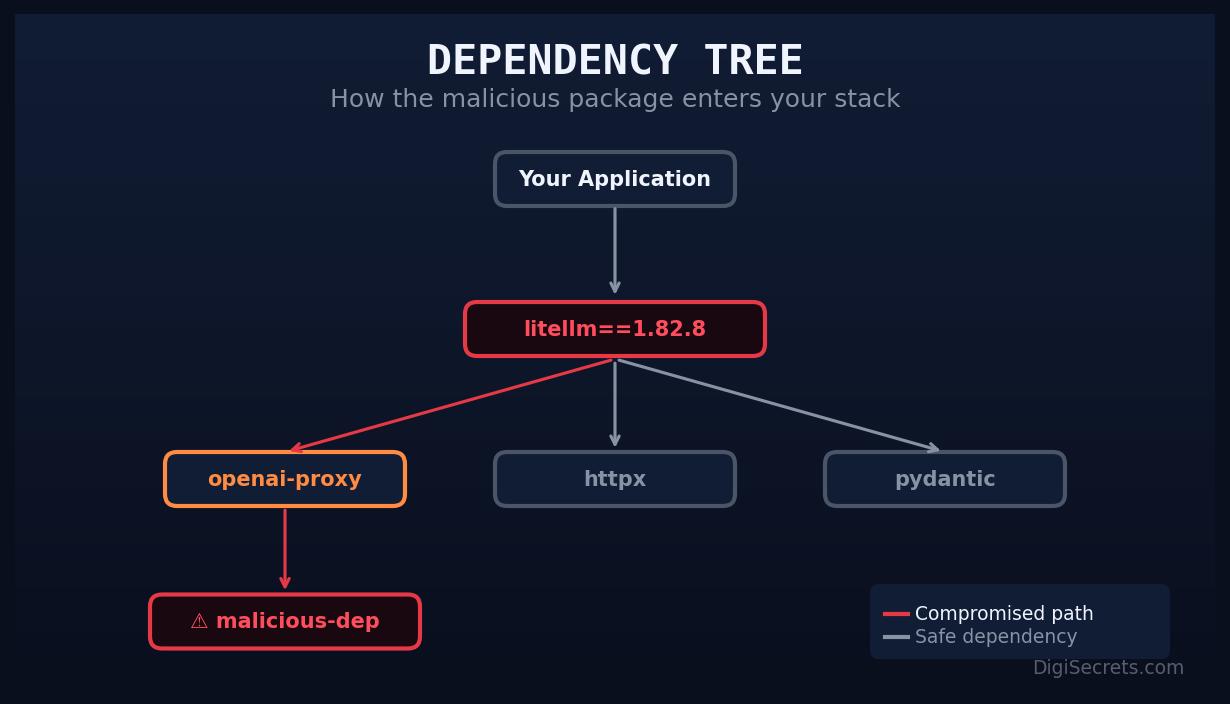
The LiteLLM supply chain attack is a symptom of a broader problem. Most AI stacks are built fast, on top of rapidly evolving open-source packages, with minimal security review. That made sense when you were prototyping. It does not make sense when you are running production workflows.
Here is the audit process I now run quarterly on every AI project:
Dependency inventory
Generate a full dependency tree:
pip list --format=json > deps-$(date +%Y%m%d).json
pip-audit > audit-$(date +%Y%m%d).txt
pip-audit checks your installed packages against known vulnerability databases. Run it. It takes 30 seconds and surfaces issues you would not otherwise catch.
Version pinning policy
Every production install should use pinned versions in a requirements.txt or pyproject.toml. Unversioned installs are fine for local experimentation, not for anything that touches production data or credentials.
Secrets management
Stop storing API keys in .env files on servers. Use a secrets manager. AWS Secrets Manager, HashiCorp Vault, and even simple solutions like Doppler are all better than a plaintext file that any compromised package can read.
Monitoring for anomalous network calls
In containerized environments, implement egress filtering. Your LLM routing layer should only be calling known model provider endpoints. Any unexpected outbound connections are a signal worth investigating.
Supply chain monitoring tools
Tools like Socket.dev and Snyk provide real-time monitoring of PyPI packages for suspicious activity. If you are running AI infrastructure at any scale, one of these deserves a spot in your stack.
For more on building defensible AI infrastructure, check out DigiSecrets’ coverage of AI automation architecture.
What This Means for the Broader AI Ecosystem
The LiteLLM supply chain attack is not an isolated incident. It is part of a pattern. As AI tooling has exploded in adoption, the attack surface has expanded dramatically. LiteLLM alone has millions of downloads. Compromise a single popular package in the AI ecosystem and you have a vector into thousands of production environments simultaneously.
Attackers know this. The economics favor them. One poisoned package, even briefly, can yield thousands of harvested API keys before it is removed.
The AI community has inherited the same dependency management culture as the broader Python ecosystem, which is to say, not particularly security-focused. That is starting to change, but the change is lagging the threat.
This attack should be a forcing function. Treat your AI dependencies with the same scrutiny you would apply to any other infrastructure component. Pin versions. Audit regularly. Rotate credentials on suspicion, not certainty.
Conclusion
The LiteLLM supply chain attack caught a lot of people off guard. It should not catch you twice.
The immediate actions are clear: verify your installed version, rotate any credentials that may have been exposed, and pin your dependencies. The longer-term work is building an audit process that does not rely on security researchers catching problems before you do.
Your AI stack is infrastructure. Treat it like infrastructure. The tools to protect it exist and most of them are free. The cost of not using them is a lot higher than the ten minutes it takes to run through this checklist.
Start with pip-audit. Right now. I will wait.
Keywords: LiteLLM supply chain attack, PyPI malware, AI dependency security, Python package audit
Leave a Reply