Most people assume AI content automation requires a monthly software bill. A Jasper subscription here, a Zapier Pro plan there, maybe a dedicated API budget on top of that.
They’re wrong.
There is a version of this stack that costs exactly zero dollars to run. The tools are free. The logic is simple. And once it’s running, it generates research, drafts, and publish-ready content without you touching a keyboard.
Here’s how it works.
The Four Tools (All Free Tier)
The stack runs on four tools:
- Make.com – automation backbone
- Claude (claude.ai) – AI research and drafting
- Notion – content database and CMS
- RSS or Google Alerts – topic triggers
That’s it. No paid subscriptions required to get started. No API costs. No monthly bills.
The Workflow That Runs on Autopilot

Step 1 – The Trigger
Everything starts with a signal. Either an RSS feed item from a competitor, a Google Alert for your primary keyword, or a scheduled Notion database item. Make.com watches for this trigger on its free tier. When it fires, the workflow begins.
Step 2 – The Research and Draft Prompt
The trigger sends a topic prompt to Claude via Make.com webhook. For free-tier users, you’ll do this step manually: open Claude.ai, paste the prompt, copy the output, and paste it into Notion. When you upgrade to Claude Pro or a Claude API account, Make.com can automate this step entirely.
Claude returns a research summary, key angles, and a draft outline. This becomes your raw content block inside Notion.
Step 3 – Notion as the CMS
The Notion database is your editorial layer. Each row is an article. Columns include: status (draft / review / approved / published), target keyword, Claude output, final draft, and publish date.
Make.com writes Claude’s output directly into the relevant Notion row. Your job – when you check in – is to review, edit, and flip the status to approved.
Step 4 – Publish on Approval
When status changes to approved, Make.com triggers again. It picks up the final draft from Notion and pushes it to your CMS. No copy-paste. No manual uploads. One status change = published.
Why This Stays Free
Make.com Free Tier
The free tier of Make.com supports 2 active scenarios and 1,000 operations/month – enough to run your core trigger-to-draft and approval-to-publish flows.
Claude Free Tier
Claude.ai is free. No API key needed. No billing setup. For manual-assist mode (Step 2), you’re using the web interface directly – paste in, paste out. It’s a 90-second task, not a workflow bottleneck.
Notion Free Tier
Notion’s free plan covers unlimited personal pages, databases, and API access for individual users. The Make.com to Notion integration works on free tier with no restrictions for this use case.
RSS and Google Alerts
Both are completely free. Google Alerts costs nothing. RSS reader tools like Feedly have free tiers that expose RSS data to Make.com via webhook.
What You’re Actually Trading
This isn’t magic. The free stack has one real cost: your time as the human in the loop.
On the paid version of this stack, Steps 1 through 4 run entirely without you. You review finished drafts. That’s it.
On the free version, Step 2 requires 90 seconds of your time per article. For a solopreneur publishing two to three articles per week, that’s under five minutes. It’s a reasonable trade for zero monthly cost.
The Realistic Output
Running this stack consistently, with two to three triggers per week:
- Week 1: Setup (two to three hours total)
- Week 2 onward: Two to three drafted articles per week, each requiring 90 seconds of Claude interaction and ten to fifteen minutes of human editing
- Monthly output: Eight to twelve publish-ready articles, all keyword-targeted, all drafted by AI
That’s a content operation most agencies would charge thousands per month to manage.
When to Upgrade
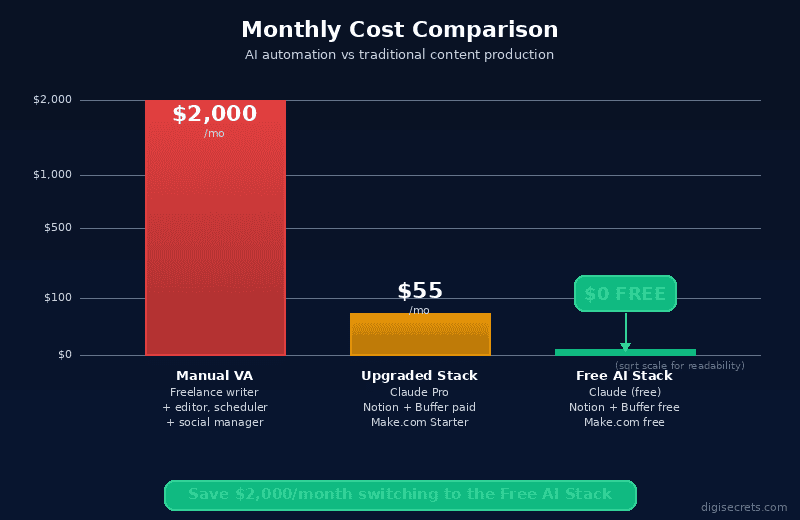
The free stack breaks at scale. Specifically:
- More than 2 active Make.com scenarios – upgrade Make.com
- More than 1,000 Make.com operations/month – upgrade Make.com
- Wanting fully automated Step 2 – Claude API account (pay-as-you-go)
- Team collaboration in Notion – Notion Plus
None of these are urgent for a solo publisher starting out. The free tier handles the first three to six months of a content operation comfortably.
Setting It Up
Notion Setup (20 minutes)
Create a database with these columns: Title, Keyword, Status (draft / review / approved / published), Claude Output, Final Draft, Publish Date.
Make.com Setup (30 minutes)
Scenario 1 – Trigger to Notion: RSS feed watcher or Google Sheets row feeds into a Notion Create page module with keyword and prompt.
Scenario 2 – Approval to Publish: Notion watcher (filter: Status = approved) triggers WordPress / Ghost Create post.
Claude Setup (2 minutes)
No setup required. Go to claude.ai. Create a free account if you don’t have one. That’s it.
The Bottom Line
The AI content automation stack free tools approach is genuinely accessible to anyone willing to spend a few hours setting it up. The tools exist. The free tiers are real. The output is legitimate.
The only question is whether you’ll actually build it – or keep paying for content that someone else automates the same way.
Start with the Notion database. The rest follows.
Leave a Reply